Use NanoVibe for Visual Production
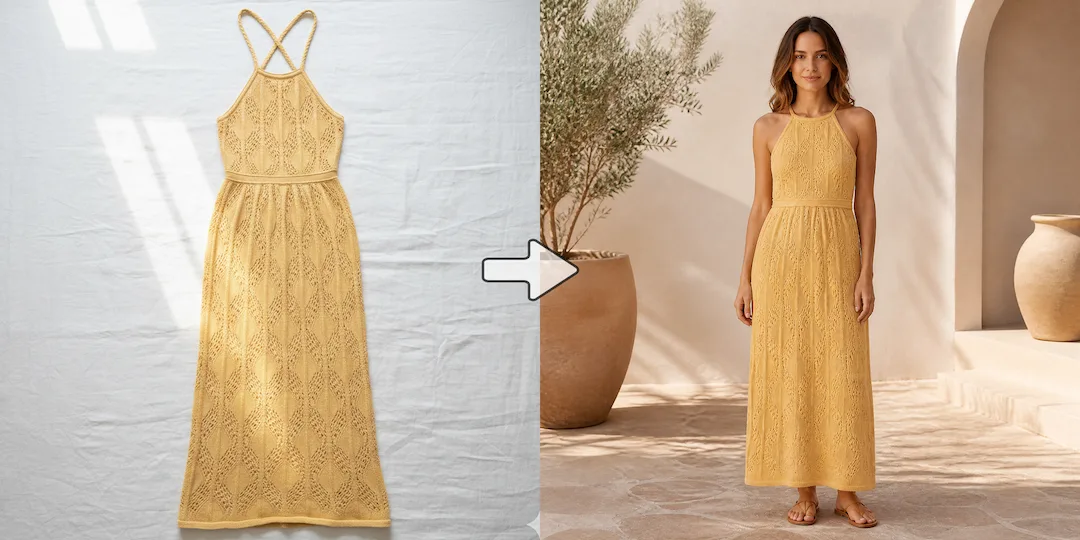
Choose NanoVibe when you need to turn a boring product shot into an engaging lifestyle image or put a garment on a lifelike AI model for a new collection launch.

AI Tool Comparison
Claid.ai is excellent for developers needing API-driven image upscaling and standardizing user-generated content. NanoVibe, however, is built for marketers and ecommerce teams who need to actively generate new visual concepts—like putting apparel on AI models or placing products in cinematic lifestyle scenes.
Decision guide
Choose NanoVibe when you need to turn a boring product shot into an engaging lifestyle image or put a garment on a lifelike AI model for a new collection launch.
Choose Claid when you have a marketplace with thousands of low-resolution user photos that need automatic upscaling and color correction.
Some teams start with enhancement-first platforms, then switch when they want an easier path from source image to more expressive fashion, product, and launch-ready visuals.
Full comparison
This comparison is not about which company understands ecommerce. Both do. The real difference is where each tool sits in the workflow. Claid is especially strong when the image pipeline needs enhancement, consistency, and API-driven scale. NanoVibe is stronger when the goal is fast visual creation across product, fashion, and campaign use cases.
NanoVibe is easier for teams that want a direct self-serve workflow for creating scenes, model photos, packshots, and campaign visuals without much setup overhead.
Claid is a strong fit for teams that think in terms of product-photo operations, seller quality control, brand consistency, and API-enabled automation.
NanoVibe is stronger when the work starts with creating new commercial assets from an existing product image, not just improving the original photo.
Claid is especially strong when the first job is enhancing, correcting, standardizing, and scaling product photos that already exist.
NanoVibe has the clearer edge when apparel teams want AI fashion models, styled on-model photos, and broader visual experimentation from a single garment image.
Claid supports fashion use cases, but many teams will still view it first through the lens of product-photo quality and catalog operations.
NanoVibe is better when the same workflow needs to support PDP visuals, launch banners, ad creatives, posters, and brand campaigns.
Claid can support marketing visuals, but its strongest story is often around consistent product presentation, scalable edits, and production-grade image handling.
NanoVibe is better for teams that want strong results without centering the workflow on API adoption, seller pipelines, or operational integration.
Claid stands out when API access, automated correction, and high-volume image processing are central requirements.
Better for fast-moving teams that want a broader AI photo workflow across product, fashion, and growth creative.
Better for product-photo operations, enhancement at scale, and teams with stronger catalog or API requirements.
Why users switch
Claid has serious strengths in product-photo quality, automation, and catalog use cases. But not every team wants to center their process on image operations. Many simply want a faster path from source photo to the set of visuals they need to launch, test, and sell.
Some teams do not need a deeper operations layer. They need marketers and ecommerce managers to generate usable visuals themselves without waiting on a more structured pipeline.
Catalog consistency matters, but so do launch assets, social variants, hero scenes, and fashion imagery. NanoVibe is better aligned with that broader commercial mix.
When API workflows, seller normalization, and brand controls are not the main bottleneck, a lighter image-first workflow can be easier to adopt across the team.
Use cases
Claid is a strong match for teams managing large catalogs, seller-submitted images, automated corrections, and API-driven ecommerce workflows.
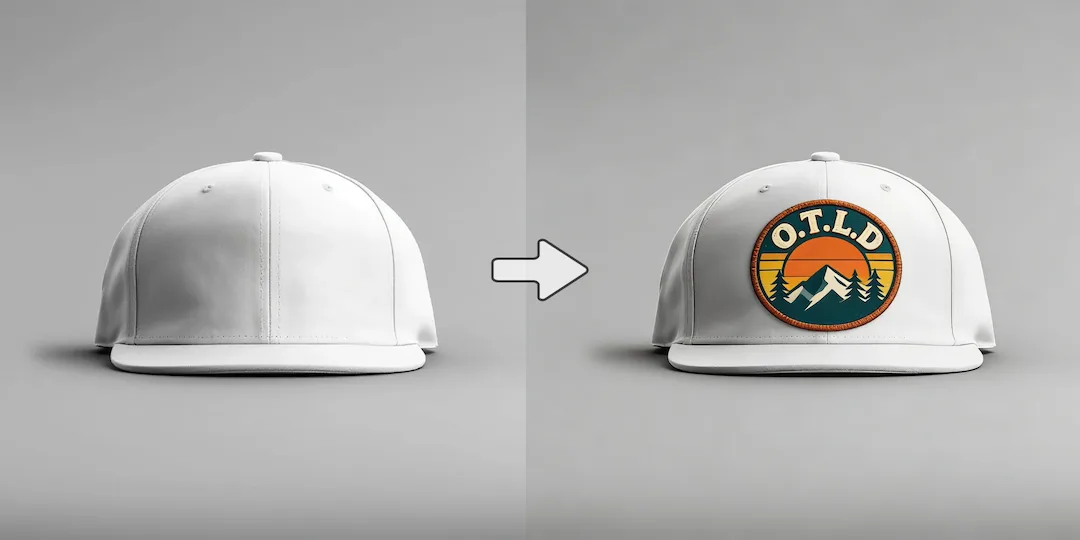
NanoVibe is stronger when the team needs ready-to-use product scenes, packshots, posters, fashion visuals, and ad creatives from one source image.
NanoVibe is the better fit for fashion teams that want garment-to-model output and more creative range without a complex setup.
Claid makes sense when the central problem is image quality, lighting correction, background cleanup, and consistent product presentation across a large catalog.
Why NanoVibe wins
NanoVibe makes more sense when marketers, founders, or ecommerce operators want to make images themselves instead of relying on a heavier production setup.
It is easier to move from one product image into scenes, posters, model shots, and other campaign assets that extend beyond pure catalog optimization.
NanoVibe is particularly compelling for apparel brands that want AI fashion models and styled product visuals as part of the same workflow.
Teams often prefer a tool that feels like a creative workflow first when API scale and image-governance concerns are not the main decision drivers.
Try it yourself
If you are comparing NanoVibe and Claid, start with the main bottleneck. Claid is a strong product-photo platform when catalog quality, automation, and scale lead the decision. NanoVibe is stronger when you want a simpler path from product image to fashion visuals, scenes, packshots, and launch-ready creative.
Try NanoVibe FreeFAQ
Yes. NanoVibe is a strong alternative for ecommerce teams that want a broader self-serve AI photo workflow for scenes, model imagery, packshots, and campaign visuals without centering the process on API or catalog operations.
Claid is often the better fit when the priority is enhancement, correction, and consistent product-image handling across a large catalog or automated workflow.
NanoVibe is generally the better fit for AI fashion models, product staging, and broader creative asset generation from a single source image.
Choose Claid when API access, large-scale image operations, and enhancement-led catalog workflows are more important than creative range and self-serve speed.
For many brands, yes. NanoVibe is more directly aligned with creating launch-ready product scenes, posters, packshots, and campaign imagery from existing product photos.
NanoVibe is a strong choice if you want less operational overhead and a more direct path to visual output for ecommerce, fashion, and marketing teams.
More comparisons
Best for teams choosing between Midjourney concept art and NanoVibe's faster workflow for product photos, ads, and launch visuals.
Compare Gemini's assistant-style image help with NanoVibe's dedicated workflow for repeatable ecommerce and marketing visuals.
See whether a general AI assistant or an image-first workflow is better for campaign creatives, product pages, and repeat visual output.
Best for teams comparing Canva's design suite with NanoVibe's image-first workflow for source assets, product photos, and campaign visuals.
Compare Photoroom's seller-focused editing and listing workflow with NanoVibe's broader AI photo workflow for models, scenes, packshots, and campaign assets.
Best for sellers comparing a utility-heavy editor with a full product photo workflow for cleanup, scenes, packshots, and promo assets.
Compare Aragon's classic business headshots with NanoVibe's broader workflow for LinkedIn photos, founder portraits, and brand imagery.
Compare Photo AI's training-heavy portrait workflow with NanoVibe's faster path to headshots, creator photos, and brand-ready portraits.
See when a free image generator is enough and when NanoVibe is better for reliable product visuals, ads, and repeat commercial work.
Compare Stable Diffusion's open model freedom with NanoVibe's faster workflow for non-technical teams shipping ecommerce and campaign assets.
Best for teams deciding between model-first Flux workflows and NanoVibe's faster route to product imagery, launch assets, and ad creatives.
Compare Claude for briefs and thinking with NanoVibe for image production when the final deliverable is a campaign or product visual.
See when Remini is enough for enhancement and when NanoVibe is better for turning repaired images into ecommerce and campaign assets.
Compare OpenArt's exploration-heavy creator platform with NanoVibe's cleaner workflow for product images, ads, and practical brand visuals.
More tools