Use NanoVibe for recurring image work
Choose NanoVibe if your team creates visuals every week for product pages, launches, paid social, and brand campaigns.

AI Tool Comparison
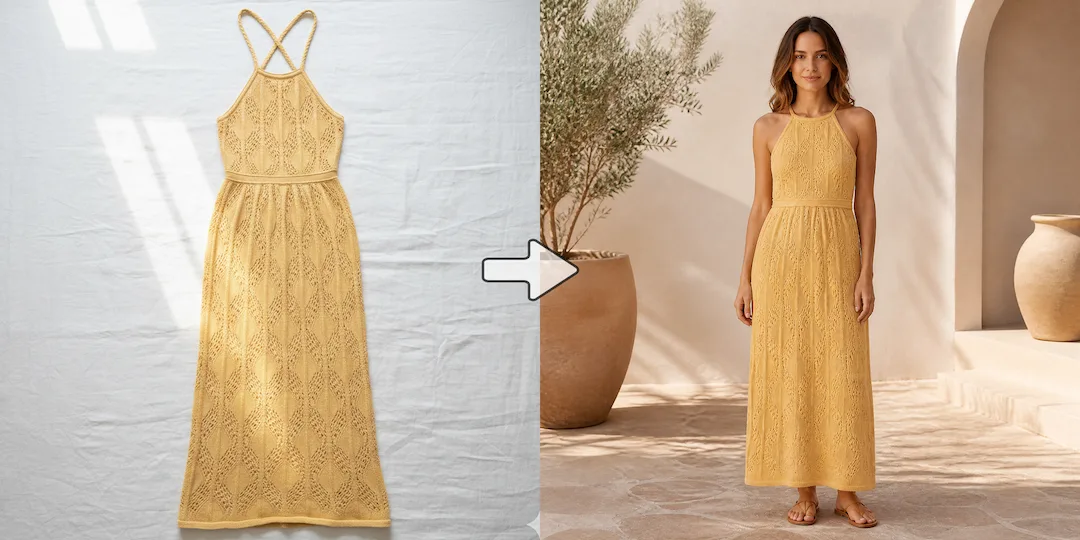
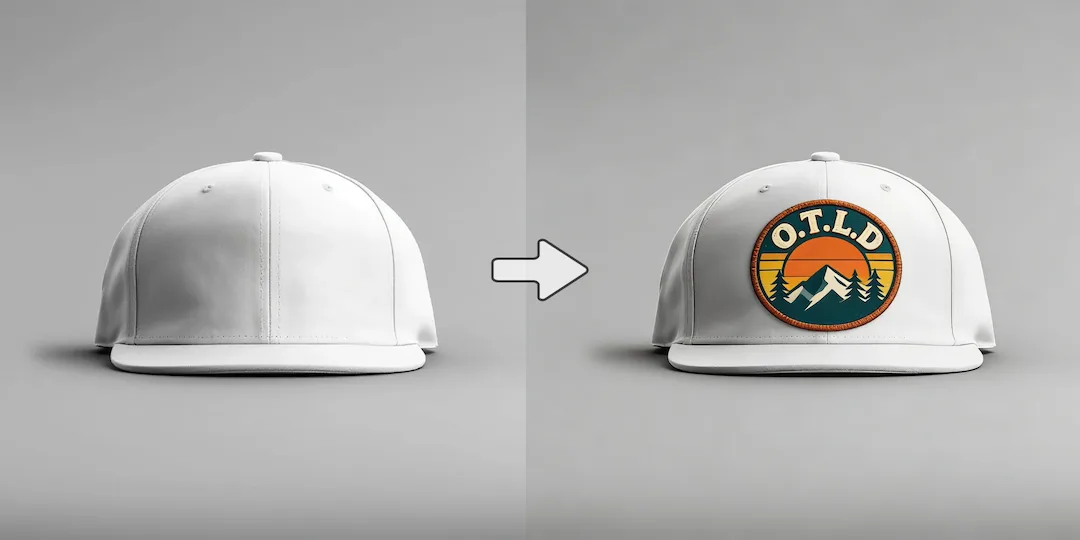
NanoVibe is built for fashion and ecommerce teams that need faster, repeatable AI photo production. It turns one product image into model photos, product scenes, clean packshots, and campaign creatives with less cost and less tool switching. Gemini is convenient inside Google for occasional image requests, but NanoVibe is the better fit when image creation is a recurring workflow for campaigns, product pages, and launch content.
Decision guide
Choose NanoVibe if your team creates visuals every week for product pages, launches, paid social, and brand campaigns.
Choose Gemini if you already live in Google tools and image generation is only an occasional request inside a broader assistant workflow.
Many teams start with Gemini because it is accessible, then move on once chat convenience is no longer enough for repeated visual production.
Full comparison
Gemini is helpful when image requests live inside a broader assistant workflow. NanoVibe is different: it is built for teams that create visuals repeatedly and need a cleaner path from request to usable ecommerce or campaign asset.
NanoVibe is designed around image tasks, so the workflow stays centered on outputs instead of conversation history.
Gemini is convenient inside Google's assistant flow, but image creation is only one feature inside a much broader environment.
NanoVibe fits better when the job is to produce a PDP image, campaign visual, social creative, or other commercial asset.
Gemini fits better when the job starts as a general request and images are only one part of the response.
NanoVibe is better when teams need consistent image output across repeated launches, edits, and content cycles.
Gemini is helpful for conversational experimentation, but can feel less structured when image work becomes a routine operation.
NanoVibe reduces context switching by keeping generation, refinement, and asset creation inside one visual workflow.
Gemini works best when you want image requests to stay alongside writing, search, and other assistant tasks.
Better for marketers, ecommerce teams, and creators who treat image production as a real part of work.
Better for users who value Google ecosystem convenience more than a dedicated image-production setup.
Why users switch
Most users who search for a Gemini alternative are not unhappy with convenience. They simply want a stronger image workflow when visual production becomes real work instead of an occasional request.
General-purpose AI is useful, but campaign, product, and brand visuals often benefit from a more focused product experience.
Occasional image generation and daily image production are different jobs. NanoVibe is better aligned with teams that create often and care about consistent output.
In real projects, images are rarely done after one prompt. Teams need edits, scene swaps, and new variants, which is where a more focused workflow becomes more valuable.
Use cases
NanoVibe is a stronger fit if you create visuals regularly and need a workflow built around image tasks rather than chat convenience.
Gemini is a reasonable choice if you only generate images once in a while and prefer staying inside a familiar assistant.
NanoVibe is more suitable when your goal is not just to generate an image, but to end up with something useful for campaigns, content, product pages, and launch assets.
Why NanoVibe wins
NanoVibe treats image creation like a core task, which makes the experience more direct for users who care about visuals first.
If you generate content often, a dedicated workflow matters more than general AI convenience, especially across launches and campaign iterations.
NanoVibe makes more sense for people who need output they can actually use in work, not just explore in chat.
When image tasks stay inside a dedicated visual flow, it becomes easier to produce packshots, ad creatives, and scene variants consistently.
Try it yourself
If you are deciding between NanoVibe and Gemini, test the image job you actually need for work. The better tool is usually the one that gets you to a usable result with fewer chat turns and less friction.
Try NanoVibe FreeFAQ
Yes, in most production scenarios. Gemini is convenient for occasional requests, but NanoVibe is usually the stronger choice when image generation is a recurring part of your marketing, ecommerce, or launch workflow.
Gemini is still the better choice when your main priority is staying inside the Google ecosystem and you only need occasional image generation as one small part of a broader assistant workflow.
Teams switch when image work stops being occasional. Once they need campaign visuals, product imagery, or frequent creative variants, a dedicated workflow usually beats chat convenience.
NanoVibe is often the better fit because it is aligned with repeat content production, product visuals, and practical asset creation rather than occasional chat-based image output.
For users whose main need is image generation and related visual work, yes. NanoVibe is positioned as a dedicated image workflow rather than a general AI assistant with image features attached.
If your main reason for switching is wanting a more focused and repeatable workflow for product images, ads, and launch creatives, NanoVibe is a strong Gemini alternative.
More comparisons
Best for teams choosing between Midjourney concept art and NanoVibe's faster workflow for product photos, ads, and launch visuals.
See whether a general AI assistant or an image-first workflow is better for campaign creatives, product pages, and repeat visual output.
Best for teams comparing Canva's design suite with NanoVibe's image-first workflow for source assets, product photos, and campaign visuals.
Compare Photoroom's seller-focused editing and listing workflow with NanoVibe's broader AI photo workflow for models, scenes, packshots, and campaign assets.
Compare Claid's product-photo enhancement and API workflow with NanoVibe's image-first workflow for model photos, product scenes, and launch-ready visuals.
Best for sellers comparing a utility-heavy editor with a full product photo workflow for cleanup, scenes, packshots, and promo assets.
Compare Aragon's classic business headshots with NanoVibe's broader workflow for LinkedIn photos, founder portraits, and brand imagery.
Compare Photo AI's training-heavy portrait workflow with NanoVibe's faster path to headshots, creator photos, and brand-ready portraits.
See when a free image generator is enough and when NanoVibe is better for reliable product visuals, ads, and repeat commercial work.
Compare Stable Diffusion's open model freedom with NanoVibe's faster workflow for non-technical teams shipping ecommerce and campaign assets.
Best for teams deciding between model-first Flux workflows and NanoVibe's faster route to product imagery, launch assets, and ad creatives.
Compare Claude for briefs and thinking with NanoVibe for image production when the final deliverable is a campaign or product visual.
See when Remini is enough for enhancement and when NanoVibe is better for turning repaired images into ecommerce and campaign assets.
Compare OpenArt's exploration-heavy creator platform with NanoVibe's cleaner workflow for product images, ads, and practical brand visuals.
More tools