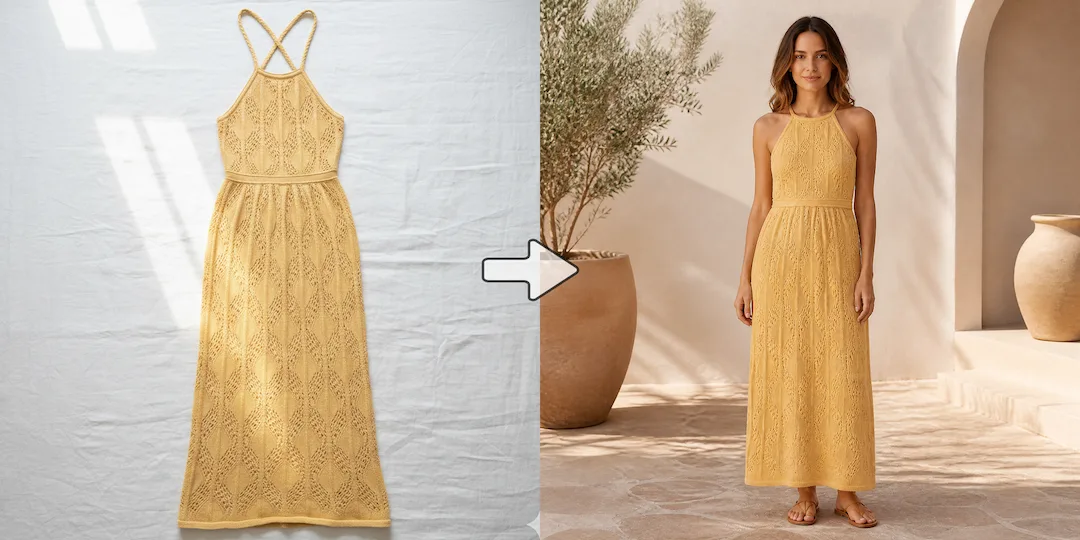
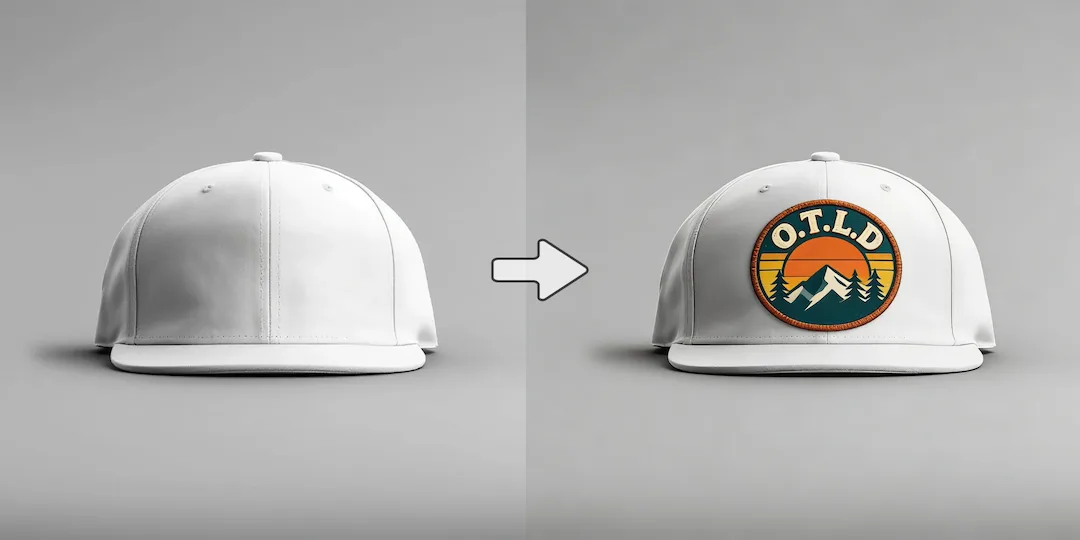
Use NanoVibe for end-to-end image tasks
Choose NanoVibe when one product image needs cleanup, enhancement, scene creation, and final delivery into a catalog, ad set, or storefront.

AI Image Editing Comparison
NanoVibe is built for fashion and ecommerce teams that need faster, repeatable AI photo production. It turns one product image into model photos, product scenes, clean packshots, and campaign creatives with less cost and less tool switching. Cutout.pro covers a wide range of utilities, but NanoVibe is often the better choice when you want product image generation, cleanup, and refinement to feel like one coherent workflow.
Decision guide
Choose NanoVibe when one product image needs cleanup, enhancement, scene creation, and final delivery into a catalog, ad set, or storefront.
Choose Cutout.pro when you mainly want a menu of utilities and are comfortable stitching the workflow together yourself.
Many sellers start with utility-heavy products, then move on when they realize the real bottleneck is not missing tools but too many disconnected steps.
Full comparison
Both products can help with image work, but they solve different problems. Cutout.pro is closer to a utility toolbox. NanoVibe is better when you want to move from raw product image to a usable ecommerce or campaign asset in one clearer flow.
NanoVibe is organized around finishing a product-image task from start to final asset with fewer hops.
Cutout.pro gives you many separate tools, which is useful for utility breadth but can feel less cohesive for end-to-end work.
NanoVibe works better when the same product image needs background cleanup, enhancement, new scenes, and promotional variants.
Cutout.pro is stronger when you only need one utility at a time and do not mind building the workflow manually.
NanoVibe is stronger when the final output needs to become a listing image, campaign asset, or storefront visual quickly.
Cutout.pro can help with cleanup and utility tasks, especially if you are comfortable piecing together multiple tools afterward.
NanoVibe stays useful after cleanup because it supports the next steps in creating campaign and product visuals.
Cutout.pro is more specialized around individual tasks than around the full creative follow-through.
Better for ecommerce teams that care about finished product visuals, not just isolated utilities.
Better for users who value tool variety and utility access more than one cohesive workflow.
Why users switch
Most users do not search for an alternative because Cutout.pro lacks features. They search because too many utilities do not always mean a better workflow for real ecommerce image production.
When the real job is to create a finished product visual, jumping between utilities can start to feel slow.
A lot of users prefer a product that helps them complete a task from start to finish instead of selecting from a long list of separate tools.
NanoVibe is a better fit if your workflow combines cleanup with creation, scene building, and ad-ready output rather than treating them as separate worlds.
Use cases
Cutout.pro is a reasonable choice if you mainly want access to image utility tools and do not mind a broader toolbox experience.
NanoVibe is the stronger fit when you want to go from raw image to usable product or promotional asset without unnecessary complexity.
If you want image generation, background cleanup, enhancement, and refinement to feel connected, NanoVibe is generally the more coherent option.
Why NanoVibe wins
NanoVibe helps users focus on outcomes rather than hunting through a long list of tools.
That makes it a stronger fit for product visuals, campaign assets, and everyday ecommerce content work.
Many users do not need dozens of utilities. They need the important steps from cleanup to final asset to feel fast and clear.
That matters when your final output is commercial, catalog-ready, or campaign-ready rather than purely experimental.
Try it yourself
If you are choosing between NanoVibe and Cutout.pro, test the actual task you need to complete. The better tool is often the one that helps you finish a usable ecommerce or campaign asset faster with fewer steps.
Try NanoVibe FreeFAQ
Yes. If your goal is to finish product visuals, promotional images, and campaign assets faster, NanoVibe is often easier to operate than a utility-heavy toolbox.
NanoVibe is often better for ecommerce images because it is aligned with creating usable end assets rather than just offering isolated utilities.
It still makes sense when your primary need is access to multiple utility tools and you do not mind piecing your workflow together across separate steps.
The biggest reason is workflow simplicity. Many sellers eventually want fewer moving parts and a more coherent path from cleanup to final product or promo image.
In many cases, yes. NanoVibe is a better fit when editing is part of a larger process that also includes generation, refinement, scenes, and content production.
NanoVibe is a strong alternative if you want fewer steps, a cleaner interface, and a more practical flow from raw image to finished visual asset.
More comparisons
Best for teams choosing between Midjourney concept art and NanoVibe's faster workflow for product photos, ads, and launch visuals.
Compare Gemini's assistant-style image help with NanoVibe's dedicated workflow for repeatable ecommerce and marketing visuals.
See whether a general AI assistant or an image-first workflow is better for campaign creatives, product pages, and repeat visual output.
Best for teams comparing Canva's design suite with NanoVibe's image-first workflow for source assets, product photos, and campaign visuals.
Compare Photoroom's seller-focused editing and listing workflow with NanoVibe's broader AI photo workflow for models, scenes, packshots, and campaign assets.
Compare Claid's product-photo enhancement and API workflow with NanoVibe's image-first workflow for model photos, product scenes, and launch-ready visuals.
Compare Aragon's classic business headshots with NanoVibe's broader workflow for LinkedIn photos, founder portraits, and brand imagery.
Compare Photo AI's training-heavy portrait workflow with NanoVibe's faster path to headshots, creator photos, and brand-ready portraits.
See when a free image generator is enough and when NanoVibe is better for reliable product visuals, ads, and repeat commercial work.
Compare Stable Diffusion's open model freedom with NanoVibe's faster workflow for non-technical teams shipping ecommerce and campaign assets.
Best for teams deciding between model-first Flux workflows and NanoVibe's faster route to product imagery, launch assets, and ad creatives.
Compare Claude for briefs and thinking with NanoVibe for image production when the final deliverable is a campaign or product visual.
See when Remini is enough for enhancement and when NanoVibe is better for turning repaired images into ecommerce and campaign assets.
Compare OpenArt's exploration-heavy creator platform with NanoVibe's cleaner workflow for product images, ads, and practical brand visuals.
More tools